

Have you ever been stuck wondering how to pay your school or college fees without standing in long queues? Thanks to modern technology, the E-Challan portal of BISE Gujranwala allows students, parents, and institutions to download fee challans conveniently online. Whether it’s a duplicate fee, migration fee, or registration fee, the portal simplifies the entire payment process, ensuring accuracy and saving valuable time.
Why Using the E-Challan Portal is Essential
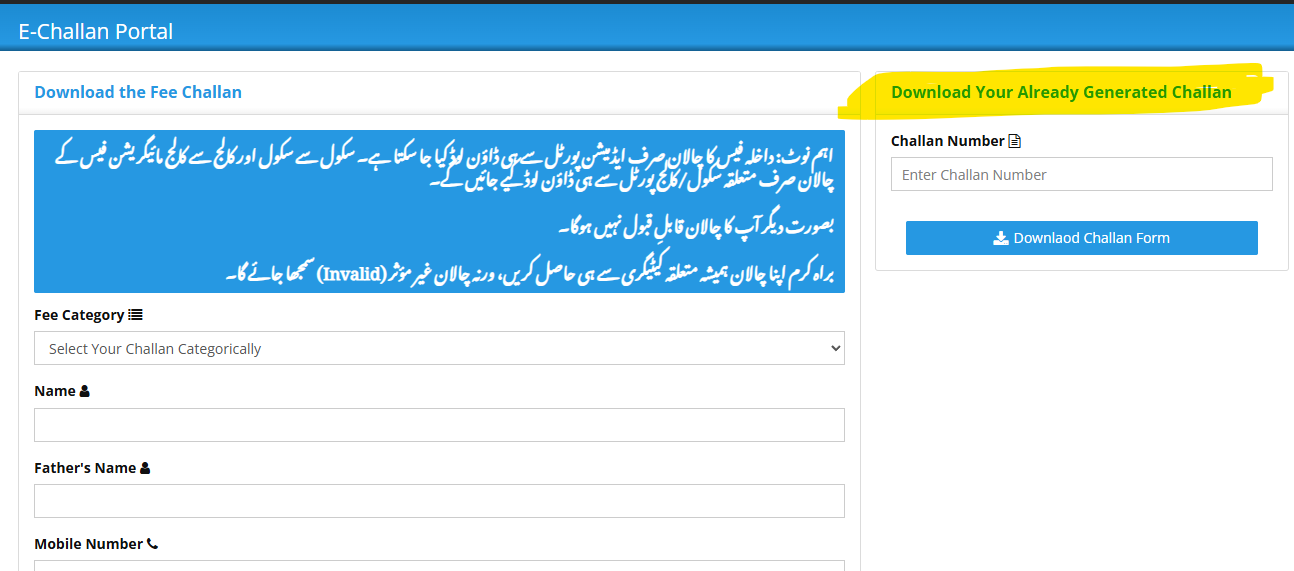
The BISE Gujranwala E-Challan portal is designed to provide students and institutions with a reliable and efficient way to generate official fee challans. One common issue is that using an invalid or incorrect challan can lead to payment rejection or delays in processing your application. Therefore, it’s crucial to download your fee challan only from the relevant portal, depending on your school, college, or specific fee category.
Some key benefits include:
- Time-saving: No need to visit the board office physically.
- Accuracy: Reduces errors that often occur with manual challans.
- Verification: Easier tracking of payments by both students and the board.
Step-by-Step Guide to Download Your Fee Challan
Here’s a practical, step-by-step guide to help you get your fee challan online without any hassle:
1. Visit the Official E-Challan Portal
Start by navigating to the official BISE Gujranwala E-Challan portal: https://services.bisegrw.edu.pk/challan/. Always ensure you access the authentic website to avoid fraudulent forms or invalid challans.
2. Select Your Fee Category
The portal provides multiple fee categories. Choosing the correct category is essential because downloading the wrong challan will render it invalid. The main categories include:
- Duplicate Fee
- Correction Fee (Before Results)
- Correction Fee (After Results)
- Verification Fee
- Affiliation Fee
- NOC / Migration
- Registration
- Miscellaneous or Other Fees
For example, if you are applying for a duplicate result card, you must select Duplicate Fee to generate a valid challan.
3. Enter Personal and Contact Information
Once the fee category is selected, fill in your details carefully. Required information usually includes:
- Name
- Father’s Name
- Mobile Number
- Address
Ensure all information matches your official records to prevent any issues during verification.
4. Generate and Download the Challan
After entering all details, click on Download Challan Form. You will get a printable PDF copy of your fee challan containing:
- Challan Number
- Amount to be paid
- Bank details
- Payment instructions
Keep this copy safe because it will serve as proof of your payment.
5. Paying and Tracking Your Fee
Take the downloaded challan to the designated bank branch to make the payment. Alternatively, some banks allow online payment using the challan number. After payment, you can also check your already generated challan or payment status by entering the challan number on the portal.
Expert Tips to Avoid Common Mistakes
- Always download the challan from the official portal only.
- Verify that the fee category corresponds exactly to your purpose.
- Double-check your personal details before generating the challan.
- Keep a digital and physical copy of your challan until the board confirms payment verification.
- For migration or NOC-related fees, use the specific school or college portal to ensure validity.
Conclusion
The BISE Gujranwala E-Challan portal is a game-changer for students and institutions looking for a secure, efficient, and convenient way to pay educational fees. By following the simple steps outlined above, you can ensure your payment is processed correctly, avoid unnecessary delays, and focus more on your studies rather than paperwork.
Whether you are paying a duplicate fee, registration fee, or any other category, the portal guarantees a smooth and reliable experience. Embrace this digital solution to simplify fee payments and keep all your records accurate and up to date.